


OnStar Guardian: Safety App
4.42.16K Reviews
App Specs
- Version
- 3.7.0
- Updated On
- License
- Free
- Downloads
- 1,000,000+
- Developer
- OnStar, LLC
- Categories
- Lifestyle
- Platform
- Android, iOS
Screenshots
 Analysis by AppCompare
I treat a safety app differently from an ordinary lifestyle download: I want to know what it can do in a stressful moment, how much it depends on a working phone connection, and whether the people I care about can use it without a complicated setup. OnStar Guardian is built around that practical question. It brings OnStar assistance onto a smartphone, making it relevant beyond time spent in a vehicle, though it works best as one part of a sensible safety plan rather than a replacement for every other option.
When a safety tool depends on a connection
Connectivity is central to the experience. Reaching an advisor, requesting help, or sharing a current location involves communication from your phone, so the app is most useful when the device can connect. That matters in ordinary situations as much as emergencies: a weak signal in a parking structure, a remote stretch of road, or a crowded venue can make any phone-based service less dependable. I would not treat a safety app as a guarantee that help can always be reached.
A useful habit is to open the app before setting out, rather than waiting until you are already worried or rushed. Check that you can get into it and that the people you expect to share with are set up. This small check does not solve poor reception, but it can prevent avoidable confusion when you need to act quickly. Keep the phone charged, too; an app cannot help much if the device is unavailable.
For someone who already values OnStar in a vehicle, the appeal is the continuity: assistance is no longer tied only to being inside that vehicle. For someone who mainly wants a fallback when driving beyond reliable coverage, a smartphone service should be considered alongside other preparations, not as a substitute for them.
Different routines call for different uses
The app suits more than drivers. A person walking home, taking public transport, or heading out alone may appreciate being able to share a location with family. Parents may find that shared visibility reassuring when household members travel separately, while a person who lives alone may value having an assistance option readily available on a phone. These are different needs, and the location-sharing side may matter more to one household than advisor access does.
Picture a familiar evening: one family member is driving, another is walking from a transit stop, and someone at home wants to know they have arrived safely. A shared location can reduce the need for repeated calls and messages. The trade-off is that location sharing is a choice that affects privacy as well as reassurance. I would agree with family members about when sharing is useful and who should be included, instead of treating access as an automatic expectation.
This is also where it helps to be clear about the app’s role. Location visibility can help people coordinate and check in, but it is not the same as someone actively monitoring every journey or guaranteeing a response. For a household that wants occasional reassurance, it may be a good fit. For people who do not want location sharing, or who prefer to keep safety planning entirely separate from family tracking, another approach may feel more comfortable.
Worth Reading Before You Choose

EA SPORTS FC Mobile 26 Is a Bigger Football Game, but It Takes Time

Flipboard Shows What News Apps Must Do Beyond the Feed

Switching to Android Auto Means Rethinking Your Driving Routine

Google Calendar Makes a Crowded Week Easier to Manage

Ludo King Makes the Most of the Minutes Between Plans

Baby Panda World Brings Quick Play to Modern Phones, but Its Game Library Feels Busy
What happens when a moment does not go smoothly?
Safety tools are easy to judge when everything works and harder to judge when a phone is locked, a user is shaken, or a connection is unreliable. I would make sure the people who may use the app know where its main controls are before an urgent situation arises. A short walkthrough together is more practical than assuming everyone will learn the interface under pressure. If someone is unfamiliar with smartphone apps, let them try the relevant steps while calm.
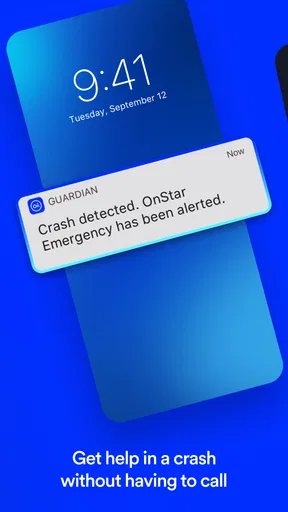
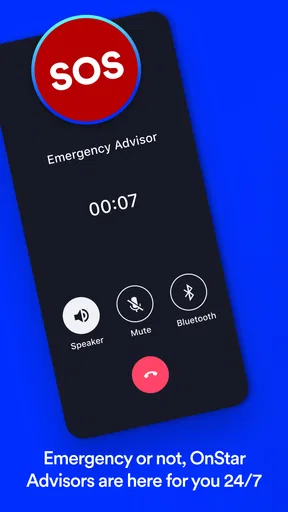
Mobile Crash Response is intended to connect a user with an OnStar Advisor after the phone detects a crash, while emergency services can be contacted through the app. Those functions address different situations, so it is worth understanding which action is appropriate rather than assuming every incident follows the same path. If you are in immediate danger and can call local emergency services directly, do not delay that call while navigating an app.
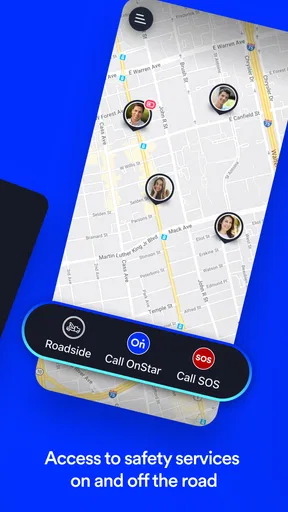
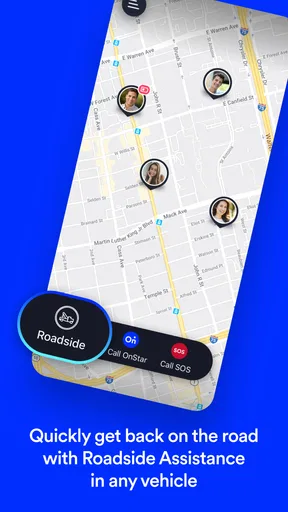
Roadside Assistance adds another practical use: requesting help with problems such as a flat tire or a dead battery even when you are away from the vehicle. That is a useful distinction for people who may not always be standing beside their car when they decide they need help. Still, it does not remove the ordinary need to explain where you are and what has happened. Knowing your location and describing the problem clearly can make a request easier to handle.
Privacy, phone readiness, and daily habits
Because location sharing is part of the experience, I would consider the social arrangement as carefully as the interface. A family circle is useful only when everyone understands who can see whom and is comfortable with that arrangement. Before relying on it, talk through who belongs in the group and what you expect the shared information to be used for. That avoids turning a helpful safety tool into a source of awkward assumptions.
There is also a practical balance between keeping the app available and limiting what you ask your phone to do. If you only need location sharing for a particular outing, use it deliberately rather than leaving a group arrangement unexplained. If the app is part of your household’s routine, make sure each person knows how to use it and how to reach help without depending on someone else to operate their phone.
OnStar Guardian is a free lifestyle app from OnStar, LLC, with an average rating of 4.3 from around 12,000 ratings and more than a million installs. It is rated for everyone, and version 3.6.9 requires Android 8.0 or later. Those details make it accessible to a broad range of Android users, but the real decision is whether its OnStar-connected assistance and location-sharing approach match the way you want to handle safety.
What is OnStar Guardian?
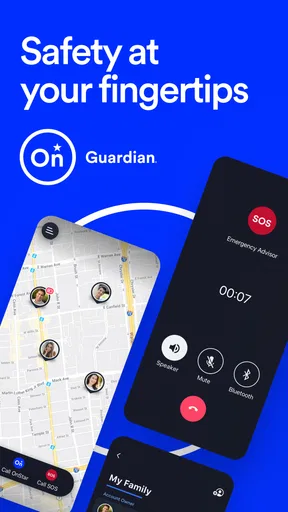
So, what exactly does the OnStar Guardian app bring to the table? In short, it extends the safety and security features of the traditional OnStar service to your smartphone. It’s designed to keep you and your loved ones safe wherever you go, whether you’re walking in the park, taking public transport, or just chilling at home. With this app, OnStar aims to broaden their assistance from the vehicle to everyday life.
Key Features to Keep You Safe
The app comes packed with features that are all about safety and security. The standout ones include:
- Mobile Crash Response: This feature uses your phone’s sensors to detect a crash and automatically connects you with an OnStar Advisor. It’s like having a virtual seatbelt that keeps you connected to help.
- Roadside Assistance: Even when you’re not with your vehicle, you can request assistance for things like flat tires or dead batteries.
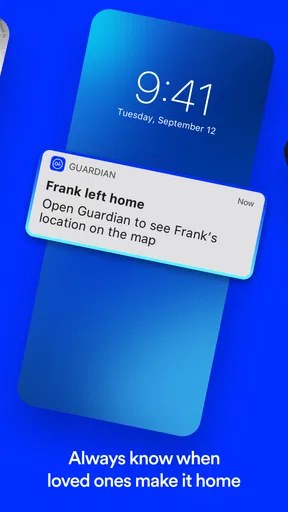
- Location Status: You can share your location in real-time with family members. It’s great for keeping an eye on loved ones or letting them know you’re safe.
- Emergency Services: With a simple tap, you can connect to emergency services. Whether you need an ambulance or police assistance, help is just a button away.
Easy to Use Interface
The user interface of the OnStar Guardian app is super intuitive. It’s designed to be user-friendly and straightforward. Even if you’re not tech-savvy, navigating through the app is a breeze. The main dashboard gives you quick access to all the key features, with large, easy-to-read buttons that make sure you can act swiftly in emergencies.
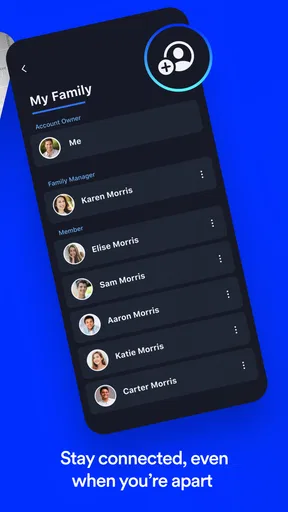
I found the Location Status feature particularly helpful. It’s not just about tracking; it’s about staying connected with family. You can set up groups, like a family circle, and everyone can see each other’s location. It’s perfect for peace of mind, especially when kids are involved.
Why Consider OnStar Guardian?
Let’s be real. In today’s world, having that extra layer of security is invaluable. Whether you’re commuting, traveling, or simply out and about, knowing that assistance is just a tap away can make all the difference. The OnStar Guardian app offers that peace of mind by keeping you connected to trained professionals who can assist you when it matters most.
Moreover, the app isn’t limited to just personal use. You can extend its features to up to seven people. This means your entire family can benefit from the app’s robust safety features. It’s like wrapping your loved ones in a protective bubble, wherever they are.
Wrapping It Up
In conclusion, the OnStar Guardian app is a game-changer for personal security services. It takes the reliable OnStar service we’ve come to trust in our vehicles and brings it to our everyday lives. The app is easy to use, packed with essential safety features, and provides invaluable peace of mind. So, if you’re looking for a way to enhance your and your family’s safety, downloading the OnStar Guardian app might just be your next best move.
Ready to take the leap? You can download the app directly from the Google Play Store or the Apple App Store. Give it a try, and let me know how it works out for you!
How it compares with everyday alternatives
Compared with relying on ordinary calls and messages, the main difference is that this app brings advisor access, roadside requests, and family location sharing into one safety-focused place. A regular call may be simpler if you already know exactly whom to contact; a map-sharing tool may be enough if all you need is to tell someone where you are. I would choose OnStar Guardian when the broader assistance options matter, not merely because it has a location feature.
It also makes most sense for households willing to agree on a shared routine. Decide who will use the app, when location sharing is appropriate, and what each person should do if the phone cannot connect. That conversation is a more useful preparation than installing it on several phones and assuming everyone has the same expectations.
Who will get the most from it
I would recommend considering it if you travel in different ways, want a way to reach OnStar assistance from a phone, or have family members who would benefit from voluntarily sharing their locations. It is particularly relevant when a household wants one familiar safety option for driving and non-driving situations. Its lifestyle category fits that broader everyday role rather than making it only a car companion.
On the other hand, it may not be the right choice for someone who wants nothing to do with location sharing, rarely uses a smartphone, or expects a phone app to work as a dependable substitute for emergency planning in areas with poor connectivity. A basic phone call, a trusted contact, or a different service may be more suitable for a particular person or setting. I would also avoid making it the only plan for a group whose members have not learned how to use it.
A practical way to decide
Before adding it to a family routine, try the non-urgent parts together: find the location-sharing controls, confirm who is included, and talk through when someone would use roadside help versus emergency services. This is a concrete way to discover whether the app suits the group without waiting for a stressful moment. It also gives each person a chance to raise privacy concerns before sharing becomes habitual.
My overall view is that OnStar Guardian is most convincing when its connected assistance and shared-location tools solve a real need for your household. It is less compelling as a download made simply because safety sounds reassuring. Think about your usual routes, who would use the app, and how you would respond if reception or the phone itself became a problem. If those trade-offs fit your routine, it can be a useful addition; if not, a simpler contact plan may be the better choice.
Pros
- User-friendly interface for easy navigation.
- Real-time location sharing with loved ones.
- 24/7 emergency services access anywhere.
- Roadside assistance included in the app.
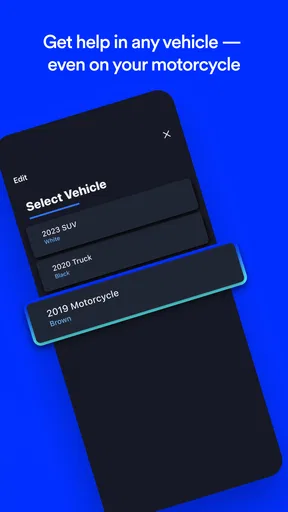
- Works on any Android or iOS device.
Cons
- Requires a stable internet connection.
- Subscription fee for full features.
- Limited features without OnStar service.
- Battery drain due to location tracking.
- May not work in remote areas.
FAQs for OnStar Guardian: Safety App
What is the main purpose of the OnStar Guardian app?
The OnStar Guardian app is designed to enhance personal safety by providing users with access to emergency services and roadside assistance. It offers features such as mobile crash detection, location sharing, and quick access to emergency contacts, ensuring that help is just a tap away whenever needed.
How does mobile crash detection work in the OnStar Guardian app?
Mobile crash detection uses sensors in your smartphone to detect sudden changes in motion that might indicate a car accident. If a potential crash is detected, the app automatically connects you to an OnStar Advisor who can assess the situation and send emergency services if necessary. This feature works even if you're not in your vehicle.
Can the OnStar Guardian app be used by family members?
Yes, the OnStar Guardian app allows you to share its features with up to seven family members. Each member can download the app, and you can all stay connected and protected. The app also allows for location sharing, so you can ensure that your loved ones are safe and where they need to be.
Is a vehicle required to use the OnStar Guardian app?
No, a vehicle is not required to use the OnStar Guardian app. It's designed to provide safety features for you and your family wherever you are, not just in the car. This makes it ideal for various activities, such as walking, biking, or even when you're at home.
What are the subscription requirements for the OnStar Guardian app?
To use the OnStar Guardian app, you need to have an active subscription. The app offers different plans that can be tailored to your needs. It's important to review the subscription options and choose the one that best fits your lifestyle and safety requirements. You can manage your subscription directly through the app.


